
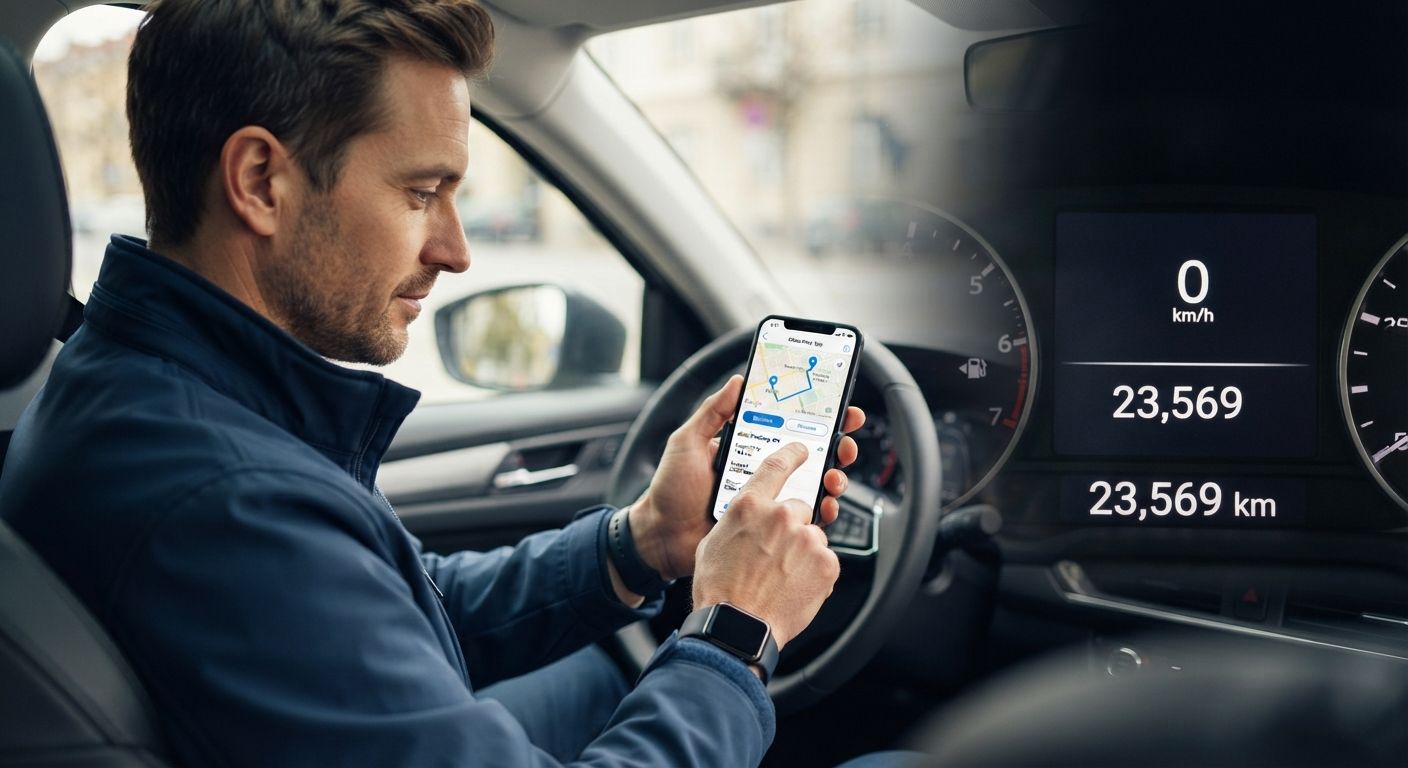
Navigating vehicle tax deductions can feel like a high-stakes balancing act. For rideshare drivers, delivery workers, independent contractors, real estate agents, sales professionals, and small business owners, your vehicle is one of your greatest income-generating assets. It is also one of your largest tax deductions.
However, claiming motor vehicle expenses is one of the most heavily scrutinized areas in tax law. Tax agencies around the globe—including the Internal Revenue Service (IRS) in the United States, the Canada Revenue Agency (CRA), the Australian Taxation Office (ATO), and HM Revenue & Customs (HMRC) in the UK—enforce strict record-keeping guidelines.
To successfully claim vehicle-related tax deductions, tax agencies explicitly demand that drivers maintain a detailed, ongoing logbook. Specifically, drivers must log:
- The exact odometer reading at the start of the fiscal year.
- The exact odometer reading at the end of the fiscal year.
- A comprehensive record for every single business trip, including the date, destination, specific business purpose, and kilometers or miles driven.
Without these precise metrics, tax inspectors can retroactively disallow thousands of dollars in expense claims, hitting you with steep penalties and back taxes.
Fortunately, manual paper logbooks and forgotten odometer entries are a thing of the past. Modern digital tax tools and automated mileage tracking software streamline the process, capturing every trip with precision while keeping you fully audit-proof.
In this comprehensive, 2,500+ word guide, we examine the mechanics of driver tax compliance, break down the features you need in a tax tool, review the top mileage tracking applications available today, and present actionable strategies to maximize your vehicle tax deductions legally.
- 1. The Mechanics of Vehicle Tax Deductions: Why Logbooks Matter
- 2. The 5 Mandated Data Points Tax Agencies Look For
- 3. Standard Mileage Rate vs. Actual Expense Method
- 4. The Evolution of Mileage Tracking: Paper vs. Spreadsheets vs. Dedicated Apps
- 5. Key Features to Look for in a Driver Tax Tool
- 6. Top 7 Tax Tools and Mileage Tracking Apps for Drivers
- 7. Step-by-Step System: Building an Audit-Proof Logbook Routine
- 8. Common Tax Traps and Audit Triggers to Avoid
- Frequently Asked Questions (FAQ)
- Final Thoughts and Actionable Checklist
1. The Mechanics of Vehicle Tax Deductions: Why Logbooks Matter
Vehicle deductions allow taxpayers to subtract the cost of operating a car, truck, or van for business purposes from their total taxable income. Every business-related mile or kilometer driven represents a direct reduction in tax liability.
However, because motor vehicles are routinely used for both personal and business activities, tax agencies treat vehicle expense claims with severe suspicion. The burden of proof rests entirely on the taxpayer.
The Business Use Percentage
To claim any vehicle expense—whether through standard rate reimbursements or proportional actual expenses—you must establish your Business Use Percentage.

To calculate this percentage accurately, tax agencies require you to prove two fundamental metrics:
- The total distance the vehicle traveled all year (derived from start-of-year and end-of-year odometer readings).
- The total distance driven strictly for qualified business activities (derived from the sum of individual logged trips).
If you lack the opening and closing odometer numbers, you cannot mathematically prove your total annual distance. If you lack trip-by-trip documentation, you cannot prove what portion of that total distance was dedicated to business. If either component is missing, your entire tax claim is vulnerable to immediate disqualification during an audit.
2. The 5 Mandated Data Points Tax Agencies Look For
Tax agencies do not accept vague estimates, generalized claims, or “reconstructed” end-of-year guesses. A compliant tax logbook must be contemporaneous—meaning recorded at or near the time of the trip—and must contain five specific data points for every fiscal period and business trip:
MANDATED LOGBOOK DATA POINTS
1. Start-of-Year Odometer Reading (Day 1 of Fiscal Year)
2. End-of-Year Odometer Reading (Final Day of Fiscal Year)
3. Trip Date
4. Origin & Destination (Exact Addresses or Locations)
5. Business Purpose (Specific Description of the Activity)
6. Distance Covered (Kilometers or Miles)
Breakdown of the Required Logbook Entry Metrics:
- 1. Opening Odometer Reading: Taken on January 1st (or the first day of your corporate fiscal year).
- 2. Closing Odometer Reading: Taken on December 31st (or the last day of your fiscal year).
- 3. Trip Date: The specific calendar day the journey took place.
- 4. Destination / Route: The starting point and endpoint of the trip. Writing “drove around town” is invalid; writing “Main Street Office to 742 Evergreen Terrace” is valid.
- 5. Business Purpose: The operational reason for the drive. Vague entries like “work” or “business” routinely trigger audit rejections. Valid entries state “Client sales presentation with Acme Corp,” “Parts pickup at Supply Depot,” or “Rideshare passenger transit.”
- 6. Distance Driven: The exact distance recorded for that specific leg of the journey.
3. Standard Mileage Rate vs. Actual Expense Method
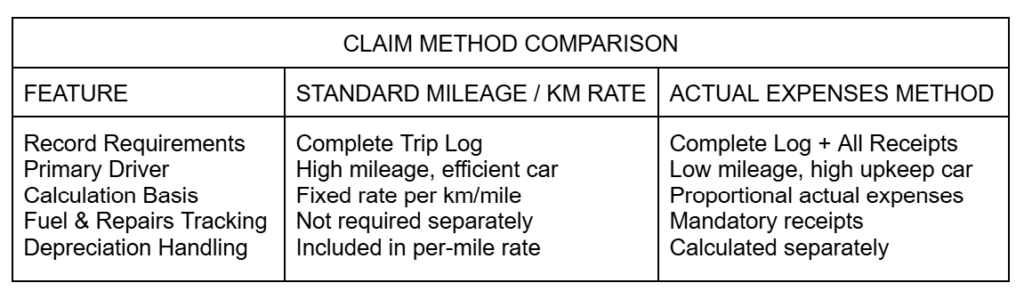
When preparing tax claims, drivers generally choose between two primary methods of deducting vehicle expenses (subject to local jurisdictional tax laws):
Option A: The Standard Mileage / Kilometric Rate
Under this framework, tax authorities issue an official baseline rate per mile or kilometer (for instance, the IRS Standard Mileage Rate or the CRA Automobile Allowance Rate).
- How it works: You multiply your total business distance for the year by the published tax rate.
- Pros: Minimal receipt tracking required. You do not need to keep receipts for gas, oil changes, or tires.
- Cons: You still MUST maintain a complete logbook detailing start/end odometer numbers and individual business trips.
Option B: The Actual Expense Method
Under this framework, you calculate the real-world operational costs of running your vehicle over the year.
- How it works: You tally all vehicle expenses—fuel, electricity/charging, maintenance, insurance, registration fees, lease payments, interest on auto loans, and depreciation—and multiply that total figure by your Business Use Percentage.
- Pros: Highly lucrative for expensive vehicles, heavy trucks, or older cars requiring substantial repair costs.
- Cons: Requires rigorous recordkeeping. You must store every single fuel, maintenance, and insurance receipt in addition to maintaining a complete mileage logbook.
Note: Regardless of which deduction method you choose, an accurate mileage logbook remains 100% mandatory.
4. The Evolution of Mileage Tracking: Paper vs. Spreadsheets vs. Dedicated Apps
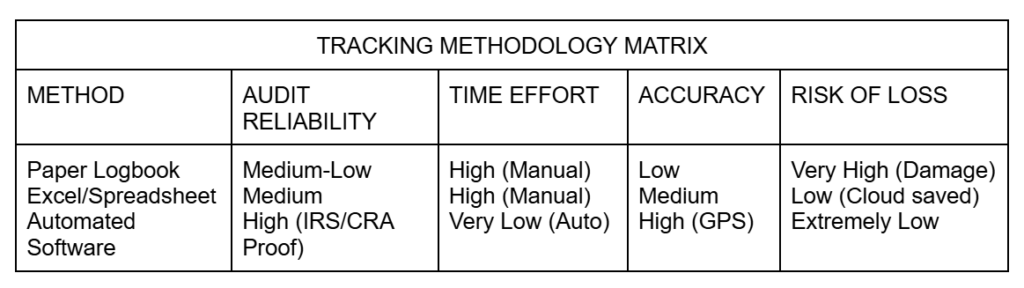
To comply with tax requirements, drivers historically relied on physical paper logs or custom electronic spreadsheets. However, modern technology offers significant advantages over traditional tracking methods.
The Paper Logbook
- The Pitfall: Drivers frequently forget to write down trips as they happen, leading to retroactively filled books, missing entries, illegible handwriting, lost physical books, and estimated numbers—all of which lead to failed tax audits.
Excel / Google Sheets
- The Pitfall: While cleaner than paper, manual data entry remains tedious. It lacks automatic start-point detection, GPS proof, and automated distance calculations, creating significant manual overhead.
Dedicated Automated Tax Tools & Apps
- The Advantage: Modern tax tools leverage smartphone sensors, background GPS, motion processing, and cloud databases to eliminate manual tracking. Trips are logged automatically as you drive, complete with start/end addresses, timestamps, and exact distance measurements.
5. Key Features to Look for in a Driver Tax Tool
When selecting software or an app to handle your vehicle deductions, prioritize features that safeguard your time and guarantee tax audit compliance:
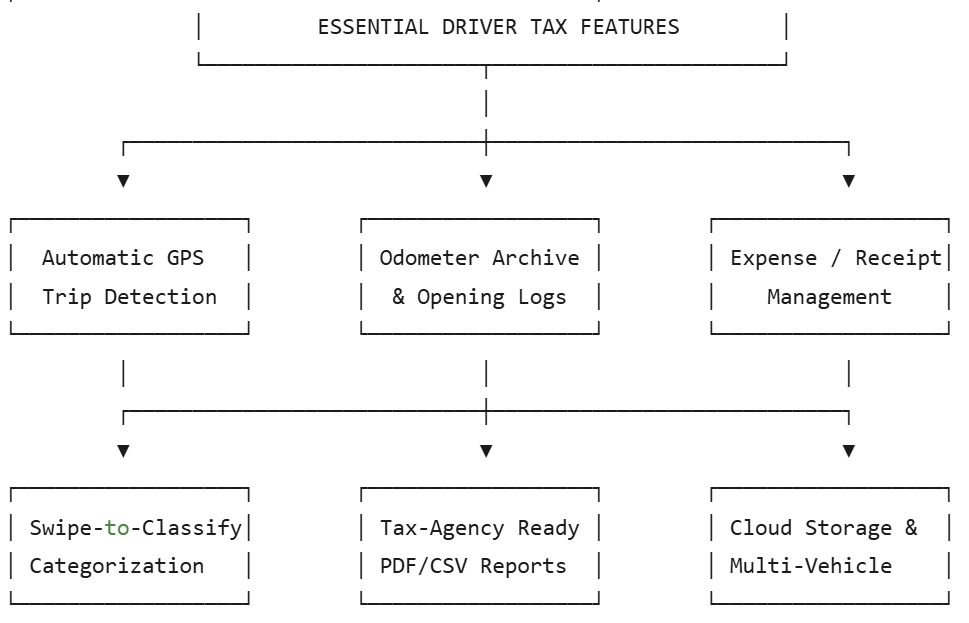
- Automatic Trip Detection: Uses background GPS, cellular triangulation, or Bluetooth beacon connectivity to auto-detect drives without requiring you to push “Start” and “Stop.”
- Year-End & Opening Odometer Prompts: Prompts you on Day 1 and Day 365 of the fiscal year to log and photograph your odometer dashboard.
- One-Swipe Trip Classification: Allows quick categorization of drives as “Business” or “Personal” with simple swipe gestures.
- Custom Business Purpose Presets: Offers easy tagging for common business activities (e.g., “Client Visit,” “Delivery,” “Site Inspection,” “Supply Run”).
- Receipt Capture and Expense Matching: Allows drivers claiming actual expenses to snap photos of fuel, repair, and insurance receipts, linking them directly to tax categories.
- Compliant Audit-Proof Exports: Generates official PDF and CSV logs formatted to meet the specific documentation rules of the IRS, CRA, ATO, or HMRC.
- Multi-Vehicle Support: Tracks multiple personal and business vehicles independently, maintaining distinct annual odometer baselines for each car.
6. Top 7 Tax Tools and Mileage Tracking Apps for Drivers
Below is an in-depth review of the top tax tools available to help drivers streamline compliance, secure deductions, and organize vehicle paperwork.
1. MileIQ
Best Overall for Set-and-Forget Automated Mileage Tracking

Overview:
MileIQ is one of the most widely used mileage tracking applications on the market. Operating unobtrusively in the background, MileIQ catches every drive automatically without draining excessive battery life.
Key Features:
- Automatic Logging: Begins tracking the moment your vehicle accelerates and stops when you park.
- Intuitive Interface: Categorize trips easily—swipe right for business, swipe left for personal.
- Custom Rules: Automatically classifies recurring drives (e.g., your daily route to a client office) as business.
- Detailed Reporting: Generates comprehensive PDF and CSV reports showing date, route, distance, standard rate valuation, and total calculated tax claims.
Audit Compliance Rating: 5/5
MileIQ provides fully compliant logs featuring exact addresses, dates, calculated trip distances, and simple year-end reporting capabilities.
2. QuickBooks Self-Employed / Intuit Solopreneur
Best for All-in-One Accounting, Tax Estimation, and Mileage Tracking

Overview:
For drivers who want to manage their overall business finances in tandem with vehicle tracking, QuickBooks offers a complete mobile platform. It tracks miles via smartphone GPS while simultaneously linking to your bank accounts to catch business expenses.
Key Features:
- Real-time Deduction Calculations: Translates driven miles into estimated real-time tax savings on your quarterly federal/state estimated tax liability.
- Integrated Receipt Snapshots: Allows you to capture fuel, maintenance, and insurance receipts directly alongside logged drives.
- Direct Tax Prep Sync: Automatically transfers your mileage logs and vehicle expense totals straight into TurboTax at tax time.
Audit Compliance Rating: 4.8/5
Ideal for drivers using the Actual Expense Method because it seamlessly pairs physical business receipts with logged business trips.
3. Hurdlr
Best for Rideshare, Food Delivery, and Multi-App Drivers

Overview:
Hurdlr was built explicitly with gig-economy drivers in mind. It seamlessly handles complex workflows, such as driving for multiple gig apps simultaneously, ensuring that every profitable mile is logged for deductions.
Key Features:
- Semi-Auto and Full-Auto Modes: Allows manual control or completely automated background tracking.
- Income & Expense Syncing: Integrates directly with platform accounts (e.g., Uber) to pull income data and cross-reference operational costs per mile driven.
- Detailed Tax Summaries: Categorizes drives by specific income streams (e.g., DoorDash vs. Instacart) to keep distinct profit-and-loss records.
Audit Compliance Rating: 4.7/5
Excels at tracking income-per-mile metrics alongside mandatory location, distance, and purpose data.
4. Driversnote
Best Dedicated Digital Logbook for Corporate & Audit Compliance

Overview:
Driversnote is built around global tax agency compliance. It focuses heavily on structured logbook presentation, ensuring your logs perfectly align with regulatory requirements across multiple countries.
Key Features:
- Bluetooth iBeacon Compatibility: Place a small Driversnote Beacon in your glove box; the app will track only when you are inside that specific vehicle, keeping non-business movement completely private.
- Odometer Tracking Prompts: Features built-in entry fields for initial and final annual odometer readings, automatically calculating total business vs. personal distribution percentages.
- One-Click Exporting: Formats logs into standardized templates pre-approved for audit submissions.
Audit Compliance Rating: 5/5
One of the most audit-focused tools available, specifically optimized for international tax rules (including CRA kilometer standards and ATO logbook formats).
5. Everlance
Best User Experience & Modern Feature Set

Overview:
Everlance combines trip detection with receipt management and revenue tracking inside an elegant, intuitive user interface.
Key Features:
- Auto-Detection Controls: Adjust sensitivity settings and define specific work hours during which auto-detection is active.
- Paper-Receipt Cloud Vault: Uses optical character recognition (OCR) to read paper receipts for fuel, parking, tolls, and maintenance, linking them to specific trips.
- Multi-Vehicle Baselines: Keep distinct odometer readings and deduction profiles for multiple operational vehicles.
Audit Compliance Rating: 4.8/5
6. TripLog
Best for Fleet Managers and Hardware Customization

Overview:
TripLog is a feature-packed tracking platform designed for power users. It offers flexible hardware triggers—including OBD-II plug-in engine devices—to deliver true automated start-stop accuracy.
Key Features:
- Multiple Start Triggers: Set trips to start tracking via OBD-II connection, vehicle Bluetooth pairing, device charging plug, or widget shortcuts.
- Real-time Fuel Price Tracking: Integrates local fuel cost data to analyze real-world operational costs per kilometer driven.
- Comprehensive Expense Tracking: Tracks non-driving expenses like parking, highway tolls, vehicle registration, and maintenance schedules.
Audit Compliance Rating: 4.9/5
7. SherpaShare
Best for Comprehensive Route Optimization & Driver Analytics

Overview:
SherpaShare offers automated tracking alongside deep analytical tools designed to help professional drivers optimize their driving routes while remaining tax-compliant.
Key Features:
- Driver Heatmaps: Visualizes your most profitable geographic zones and business travel routes over time.
- Secure Cloud Storage: Stores all trip details, vehicle maintenance logs, and location records securely in the cloud for easy retrieval during an audit.
- Comprehensive Tax Engine: Calculates exact tax deductions under both standard mileage rates and actual expense methodologies.
Audit Compliance Rating: 4.6/5
7. Step-by-Step System: Building an Audit-Proof Logbook Routine
Using software is only half the battle; establishing a consistent, compliant operational process completes your audit protection. Follow this step-by-step workflow:
Step 1: Capture Your Opening Fiscal Odometer Reading
On the very first day of your fiscal year (e.g., January 1st), sit in your driver’s seat and:
- Snap a clear photo of your dashboard showing the overall vehicle odometer.
- Store this image in a dedicated tax folder on your phone or cloud storage.
- Log this precise number into your chosen tax tracking app under your vehicle profile.
Step 2: Configure Auto-Tracking Triggers
Ensure your chosen mobile app is set to auto-detect movement. Enable “Always Allow” location permissions in your mobile OS so background GPS can record trips without requiring you to manually open the application every time you get in the car.
Step 3: Implement a Weekly “Log Cleaning” Routine
Set a recurring calendar reminder every Friday afternoon or Sunday evening to review your logged trips.
- Swipe to categorize any unclassified trips as “Business” or “Personal.”
- Confirm that every business trip includes a detailed purpose (e.g., replace vague entries like “Meeting” with “Contract negotiation with Apex Vendors”).
Step 4: Capture Supporting Expense Records
If you are tracking actual vehicle costs, photograph every fuel receipt, repair invoice, and insurance payment using your app’s built-in camera tool immediately after purchase.
Step 5: Capture Your Closing Fiscal Odometer Reading
On the final day of your fiscal year (e.g., December 31st):
- Snap a photo of the dashboard displaying the ending odometer reading.
- Record this figure in your app to finalize your total annual distance driven.
Step 6: Export, Cross-Check, and Archive
At tax preparation time, export your annual summary report in both PDF and CSV formats. Ensure that:

Store these exported files alongside your tax returns in a secure cloud directory.
8. Common Tax Traps and Audit Triggers to Avoid
Even well-intentioned taxpayers frequently fall into avoidable tax traps that trigger red flags during audits. Stay protected by avoiding these four common errors:
1. The “Commuting” Fallacy
Tax agencies treat regular daily commuting—driving from your personal home to your main, regular office or workplace—as non-deductible personal travel.
- The Exception: Driving from your home to a temporary workspace, a client meeting, or a secondary job site is generally tax-deductible. Ensure your app properly flags regular home-to-work trips as personal travel.
2. Claiming 100% Business Use on a Sole Primary Vehicle
Asserting that a vehicle is used 100% exclusively for business when it is your only personal vehicle is one of the single most common audit triggers. Tax inspectors assume that personal tasks (grocery shopping, weekend errands) occur throughout the year. Unless you have a second, dedicated personal car, keep your business claims realistic (e.g., 70%–90%).
3. Rounded or Estimated Distance Numbers
Submitting trip logs filled with neat, rounded entries (e.g., 15.0 km, 20.0 km, 50.0 km) signals to tax auditors that the log was reconstructed from memory rather than recorded contemporaneously. Real-world journeys result in uneven numbers (e.g., 14.3 km, 21.7 km). Automatic GPS tools ensure your mileage data stays precise and audit-ready.
4. Retroactive Log Construction
Attempting to rebuild a year’s worth of driving logs the week before filing your taxes is risky and ineffective. Tax agencies use sophisticated metadata analysis to verify whether digital files were generated over the course of the year or created in a single batch right before filing. Automated tax tools log timestamps in real time, serving as concrete proof of continuous compliance.
Frequently Asked Questions (FAQ)
Final Thoughts and Actionable Checklist
Vehicle tax deductions represent one of the single most powerful financial tools for independent drivers, business owners, and mobile professionals. However, turning driven kilometers or miles into legal tax deductions requires strict compliance with tax agency guidelines.
By automating your record-keeping with dedicated tax software, recording your start-of-year and end-of-year odometer baselines, and tagging every business trip’s origin, destination, purpose, and distance, you convert a potential tax liability into an organized, audit-proof deduction.